
KDP Code
Work with AI inside your project: understand requirements, edit files, operate engineering tools, and inspect the results.
The complete engineering AI workspace
Projects and conversations on the left, the working conversation in the center, and engineering guidance and work panels on the right.
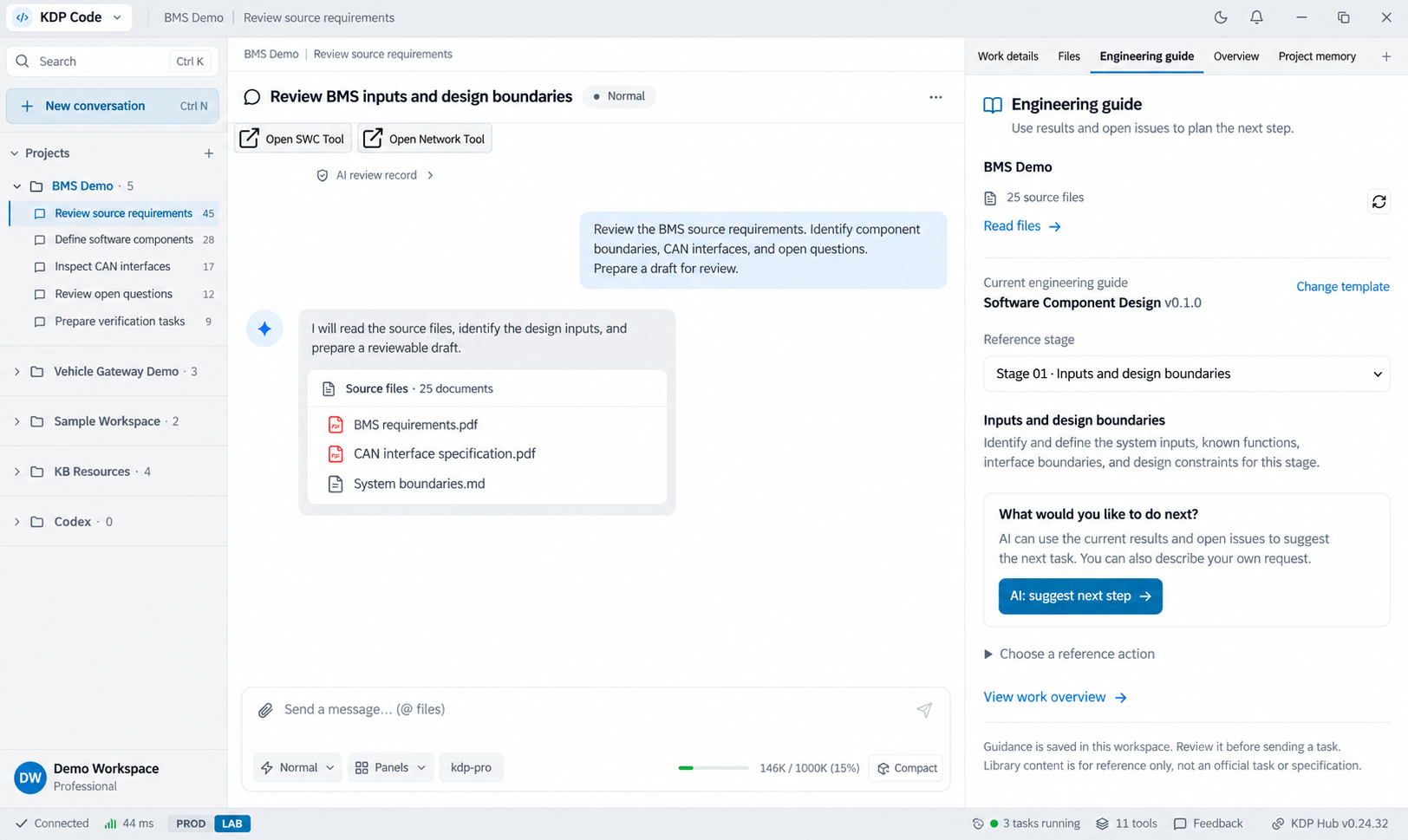
Recreated from the supplied KDP Code workspace reference, retaining project navigation, conversation, engineering guidance, and status-bar layout. Accounts, conversation, and values are illustrative. AI-generated interface illustration, not an original screenshot.
Open full-size imageFrom a conversation to inspectable engineering work
KDP Code brings conversations, project context, and tool operations into KDP Hub. Engineers can ask AI to read and edit files, run commands, or call connected tools, then inspect changes and results before continuing. MCP, Skills, and DSL provide different kinds of capability; not every action passes through a DSL pipeline.
Start with project files and a clear task; continue the same conversation.
File, command, and MCP operations follow the execution policy and granted scope.
Check actual changes, tool responses, and validation results before calling work complete.
The engineering workspace
Conversations and project context
Provide the task and relevant files, ask follow-up questions, and refine constraints as work progresses.
Files and code
Search, read, and edit project content, then run commands for builds or checks. Available operations depend on workspace and permission settings.
MCP and engineering tools
Use capabilities exposed by connected tools. Tools that support a visible window can open their interface from the conversation.
Engineering guidance and next steps
Read guidance for the reference stage and prepare the next instruction using current results and open questions. Review and edit the instruction before sending it.
Execution and changes
Inspect tool activity, returned results, and related changes to distinguish completed actions, failures, and remaining work.
Context management
Conversation history, project memory, and context compaction help continue longer tasks. Check AI conclusions against the source material.
From a task to verified results
Set a goal, let Code work through available tools, and review the output with appropriate engineering checks.
Select a project
Confirm the workspace, files, and tools.
Describe the task
Specify outputs, constraints, and verification criteria.
Review the approach
Check the interpretation and proposed scope.
Run operations
Handle tool calls and required approvals under the active policy.
Inspect results
Review file changes, tool responses, and errors.
Verify and continue
Run relevant checks, then complete or revise based on evidence.
Outputs you can inspect
Project file and code changes
Command and tool execution results
Data in connected engineering tools
Conversation and work records for follow-up
FAQ
Does KDP Code only work through DSL?
No. It also supports file, command, and MCP tool operations. DSL is one capability within the engineering toolchain.
Does every operation require a separate approval?
That depends on the operation, mode, and permission policy. Approval controls do not guarantee zero risk; review changes and validate them with appropriate tests.
Are all tools and AI features shown immediately available?
They require the appropriate version, account permissions, model service, and tool connections. The preview uses example conversations and values, not evidence that the illustrated engineering task has run.