
Fast start and reusable workspace
Resume recent work, create or open a folder-based project, or explore the Virtual ECU demo without hardware. Saved multi-page layouts carry the same tuning context into the next session.
XCP-on-CAN ECU Calibration and Measurement Tool
Connect ECU calibration, DAQ measurement, parameter-set management, and trace analysis over XCP-on-CAN in one engineering workspace.
Keep the full engineering context from A2L project setup to calibrated ECU results
KITE Calibrator is an XCP-on-CAN tool for ECU development and calibration teams. Import A2L and ELF / AXF / OUT data into a reusable multi-page workspace, then read, write, and observe ECU data through numeric, graphic, parameter, curve / map, and array panels. DAQ recorders, CAN / XCP trace, MF4 playback, and Par Set Studio connect measurement, issue analysis, and parameter-set comparison in one repeatable workflow. A built-in Virtual ECU demo also lets teams explore calibration and measurement without physical hardware.
Resume recent work, create or open a folder-based project, or explore the Virtual ECU demo without hardware. Saved multi-page layouts carry the same tuning context into the next session.
Read and write scalar, curve, map, and array data over XCP-on-CAN while DAQ or polling continuously updates engineering values.
Configure DAQ recorders, export MF4 / ASC, and inspect communication with filtered, aggregated, and decoded CAN / XCP traces.
Use Par Set Studio to load PAR / CDFX / CSV, capture ECU snapshots, compare differences, and selectively activate parameter values.
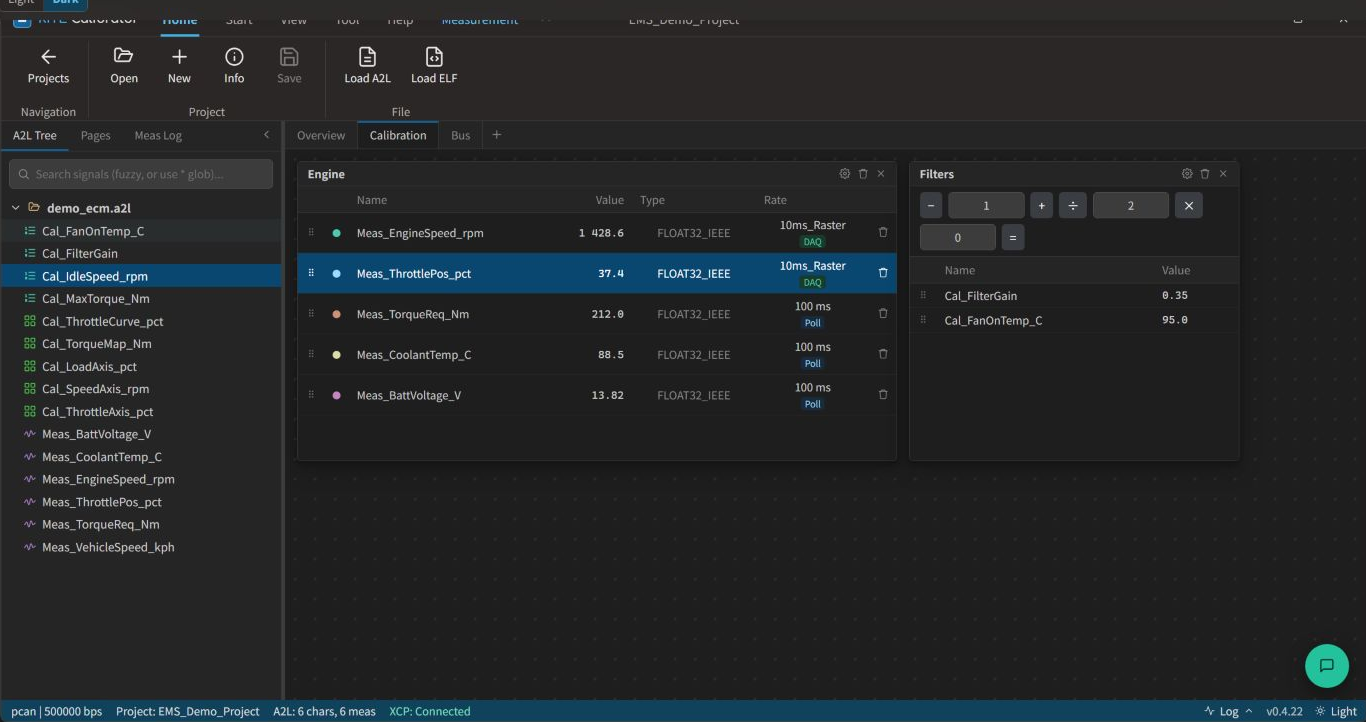
Explore eight actual interface views covering Numeric, Graphic, curve / map, DAQ, trace, Par Set Studio, A2L Editor, and the hardware-free demo workflow.
Screen 01 / 08
Arrange numeric, parameter, graphic, and array panels on project pages, save the layout and session state, and continue where the calibration session left off.
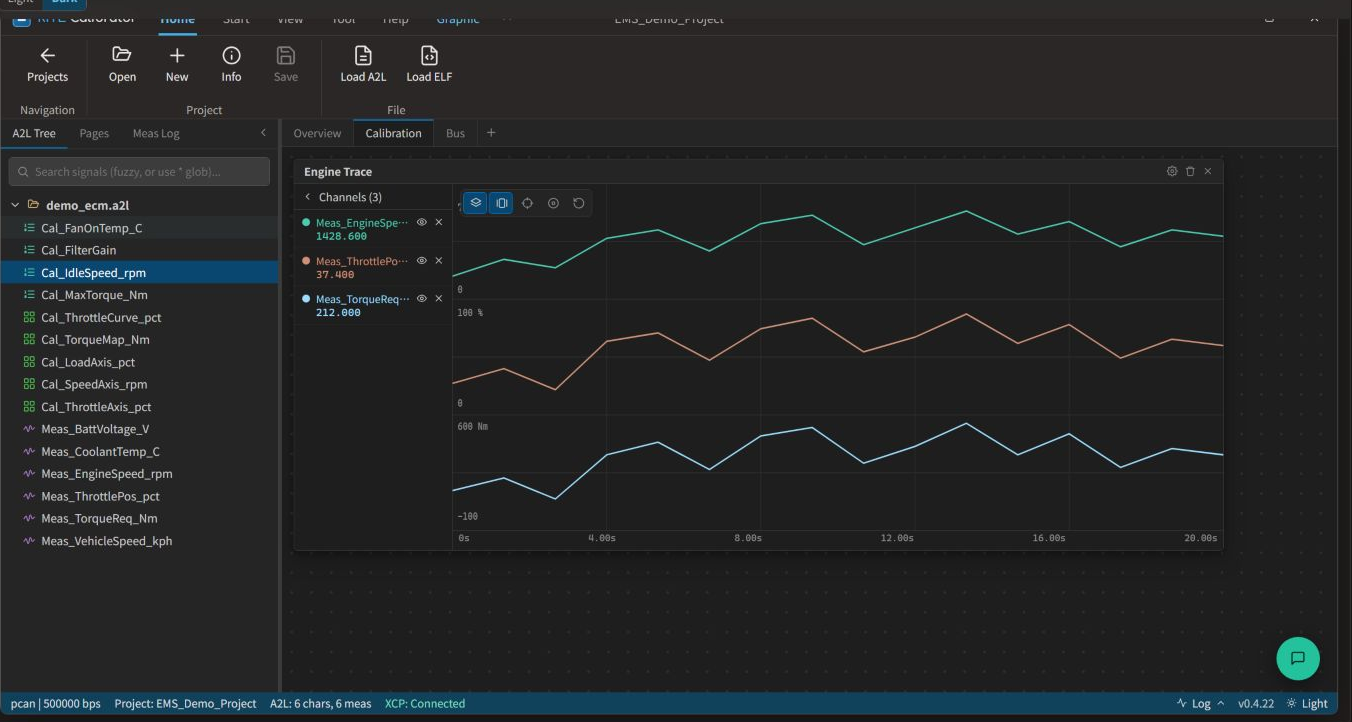
Screen 02 / 08
Plot multiple measurement signals with independent Y axes, then inspect ECU behavior with time windows, cursors, markers, and zoom controls.
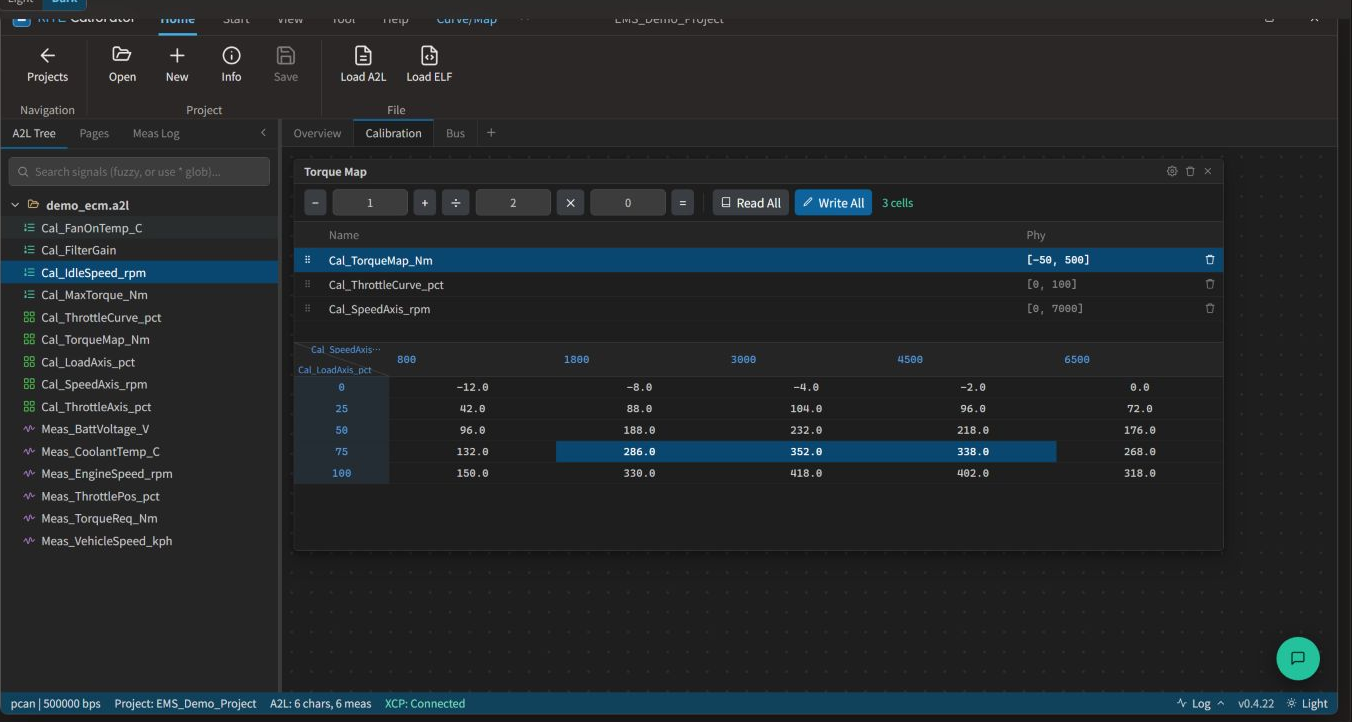
Screen 03 / 08
Select multiple curve, map, or array cells for batch arithmetic, interpolation, Read All, and Write All operations while enforcing physical limits.
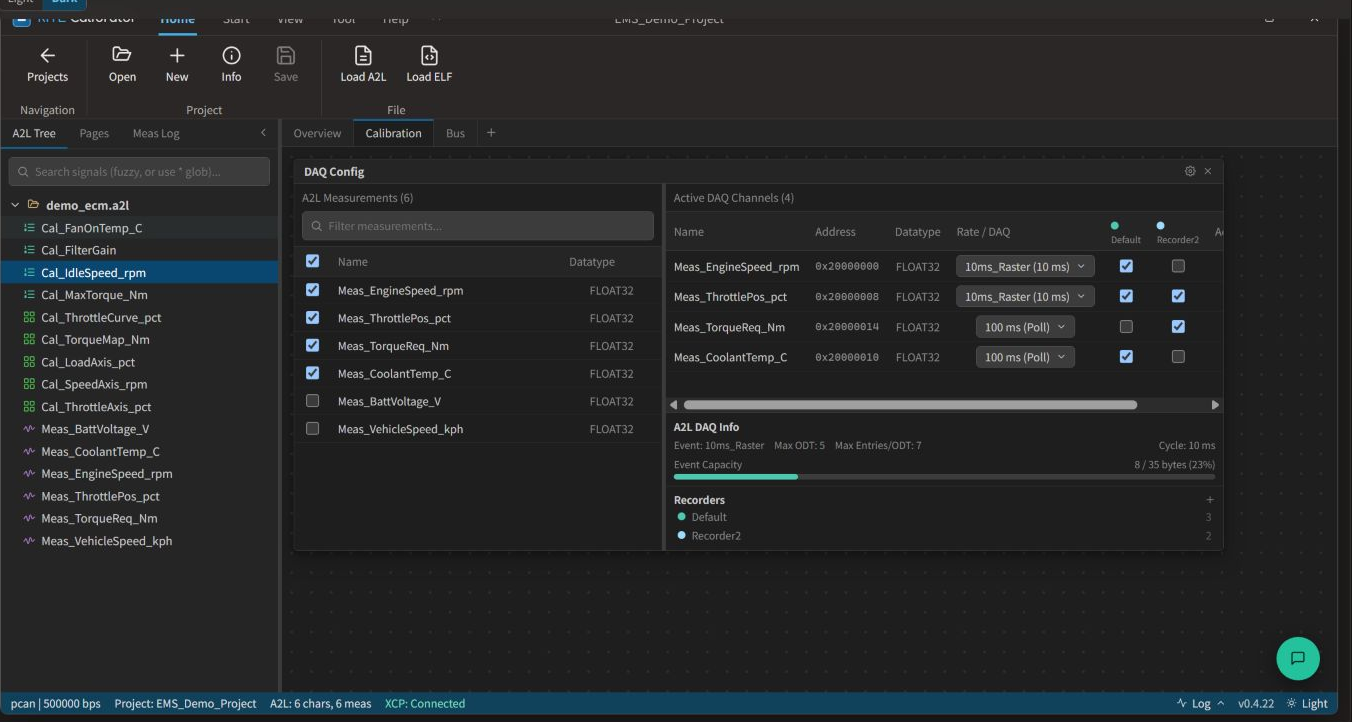
Screen 04 / 08
Assign DAQ channels and update rates from A2L events, use polling where needed, route selected signals to MF4 / ASC recorders, and monitor ODT capacity.
Screen 05 / 08
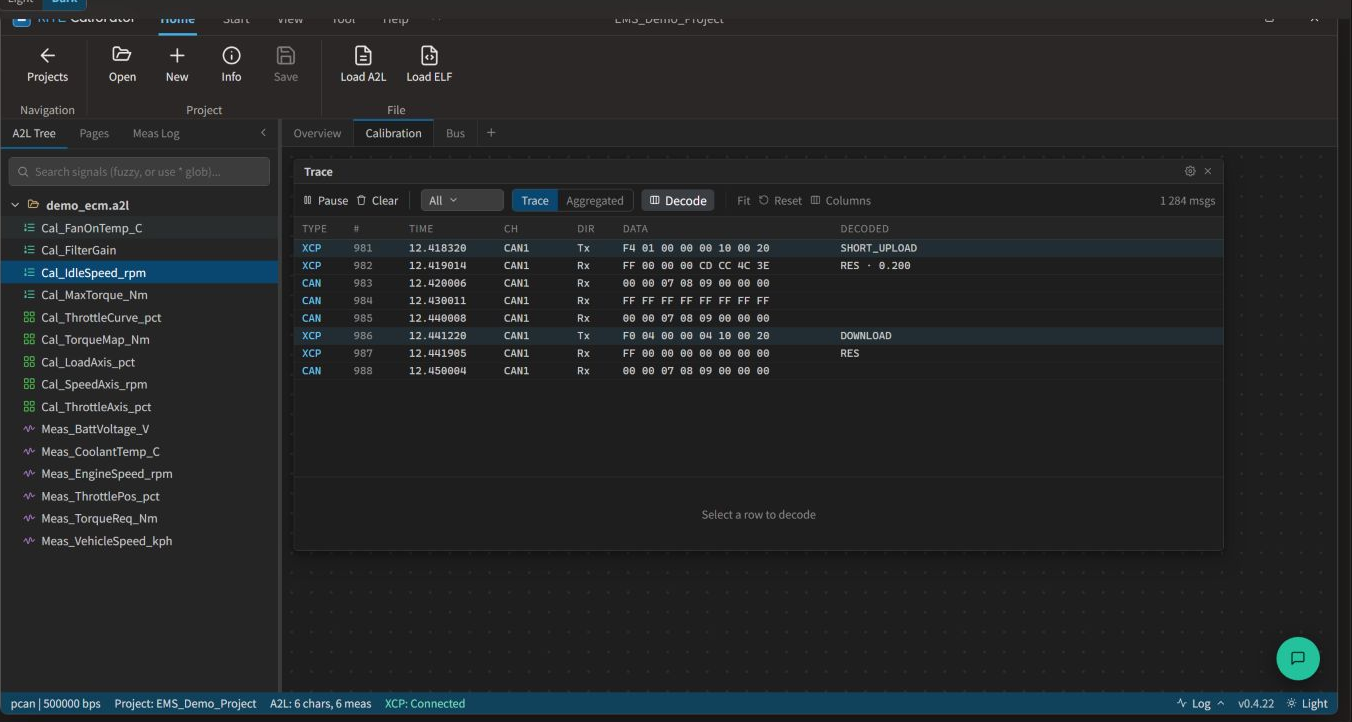
Inspect CAN and XCP Tx / Rx messages on one timeline and use filtering, aggregation, and row-level decoding to isolate connection, measurement, or write issues.
Screen 06 / 08
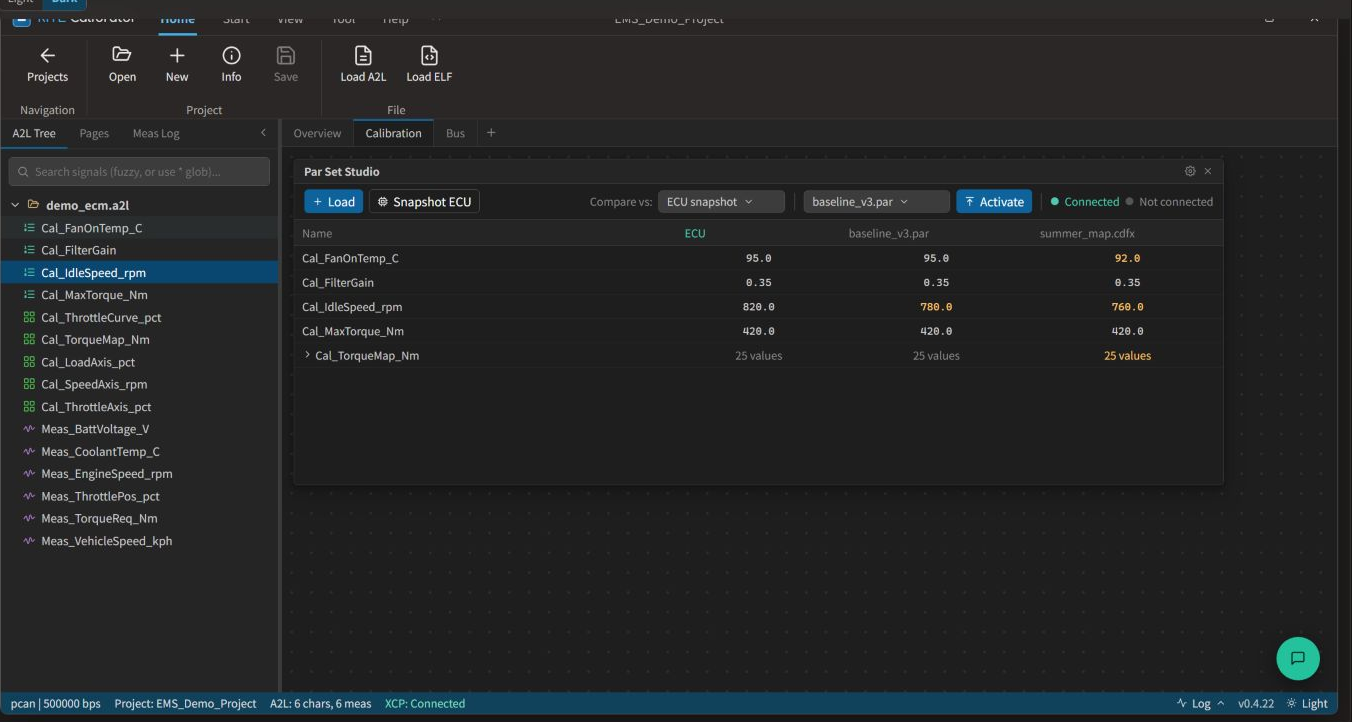
Load PAR / CDFX / CSV files, capture an ECU snapshot, compare values and changes across columns, and select the parameter set to activate on the ECU.
Screen 07 / 08
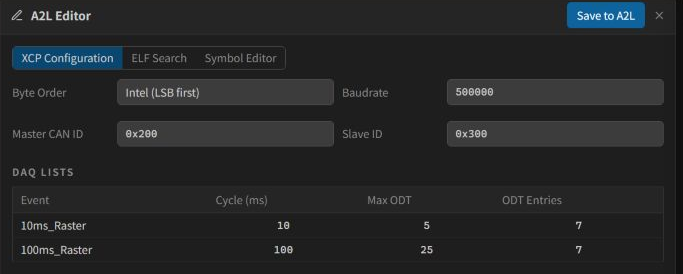
Map ELF debug symbols to CHARACTERISTIC, ARRAY, and MEASUREMENT entries, then save updated addresses or new data entries back to A2L.
Screen 08 / 08
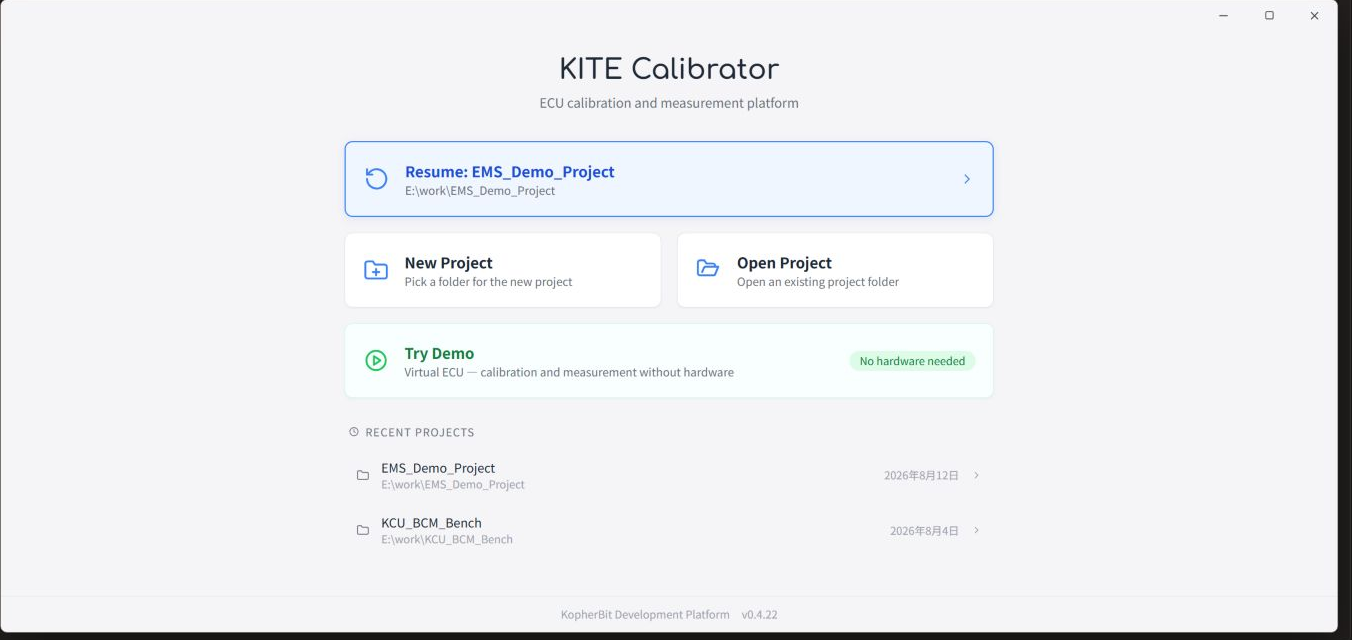
Resume a recent workspace, create or open a project, or launch the Virtual ECU demo to explore calibration and measurement without physical hardware.
Builds an ECU calibration data model from A2L and ELF / AXF / OUT, with A2L Editor for XCP settings, symbols, and data addresses.
Saves multiple measurement and calibration pages in one project and combines online scalar, curve, map, and array access with batch operations and readback.
Connects DAQ recorders, MF4 playback, CAN / XCP trace, and Par Set Studio for measurement, issue analysis, difference review, and parameter activation.
Load A2L, ELF / AXF / OUT, and DBC data for characteristics, measurements, axes, conversions, record layouts, DAQ events, and ECU addresses. Projects retain page layouts and measurement records.
Use XCP Configuration, ELF Search, and Symbol Editor to create or update CHARACTERISTIC, ARRAY, and MEASUREMENT entries and save symbol addresses and data definitions back to A2L.
Read and write scalar, curve, map, and array / VAL_BLK data online with physical limits, batch arithmetic, interpolation, Read All / Write All, and readback confirmation.
Assign DAQ channels, rates, and ODTs from A2L events, use polling where needed, and display engineering values, trends, cursors, and markers in numeric and graphic panels.
Route channels to MF4 / ASC recorders, load MF4 files for offline playback, and filter, aggregate, and decode CAN / XCP Tx / Rx messages in the trace view.
Load PAR / CDFX / CSV, capture ECU snapshots, compare parameter differences, and selectively activate values. Intel HEX export and parameter HEX write-back are also available.
Start with data preparation and XCP connectivity, then move through workspace setup, online calibration, measurement analysis, and parameter-set delivery as one repeatable ECU tuning method.
01 / 06
Load A2L and ELF / AXF / OUT, then confirm characteristics, measurements, addresses, conversions, and DAQ event definitions.
02 / 06
Select the CAN interface and channel settings, connect over XCP-on-CAN, and confirm session, memory access, and DAQ capabilities.
03 / 06
Create numeric, graphic, parameter, curve / map, and array pages, place signals and parameters for the task, and save the layout.
04 / 06
Read ECU values, adjust characteristics individually or in batches, write the result, and confirm the actual state through readback.
05 / 06
Start DAQ or polling, record MF4 / ASC, and analyze control behavior and communication with trend charts and CAN / XCP trace.
06 / 06
Compare ECU snapshots with PAR / CDFX / CSV sets, selectively activate the result, and save the project, measurement records, or HEX output.
Designed for ECU bring-up, control-strategy tuning, bench / HIL measurement analysis, and parameter-set validation and delivery.
Confirm A2L addresses, XCP connectivity, memory access, and initial measurement signals to establish a usable calibration baseline.
Adjust thresholds, gains, curves, maps, and arrays online while observing ECU behavior and retaining readback results.
Use DAQ, graphic pages, MF4 recorders, and bus trace to analyze control variables, sensors, states, and communication behavior.
Compare ECU snapshots, PAR / CDFX / CSV, and project settings, then save verified parameter sets, measurement records, or HEX output.