
17 SID-specific editors
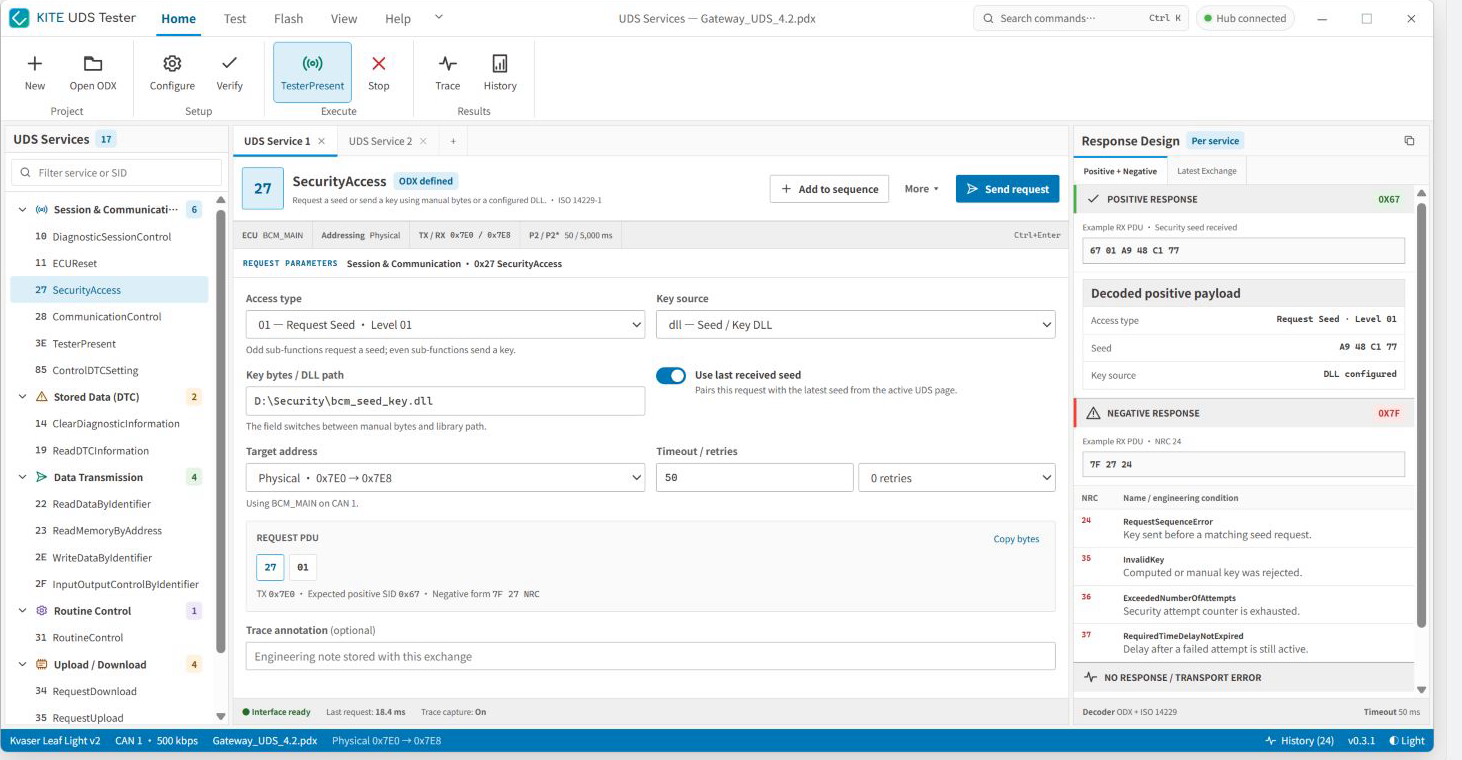
Switch input fields and response design by service category instead of forcing every diagnostic action through one raw-payload form.
ODX-Driven UDS Test Automation Tool
KITE UDS Tester drives UDS test automation from ODX: generate test cases, execute them in batches, analyze responses and NRCs, and consolidate trace and reports.
A UDS workbench from individual SIDs to test projects and flashing workflows
KITE UDS Tester loads a PDX container, ODX-D, ODX-F, or XML, validates references, and expands the diagnostic data into service editors for 17 commonly used SIDs. Its automation engine generates cases from ODX service, state, timing, positive / negative response, and functional-addressing settings, then batch-runs them and consolidates Passed, Failed, Skipped, NRC, trace, and report results. Engineers can also configure CAN / ISO-TP, TesterPresent, and a Seed / Key DLL, or organize ECU programming with Flash Sequence and Memory Layout.
Switch input fields and response design by service category instead of forcing every diagnostic action through one raw-payload form.
Show positive responses, NRCs, engineering conditions, and no-response / transport errors in the same view.
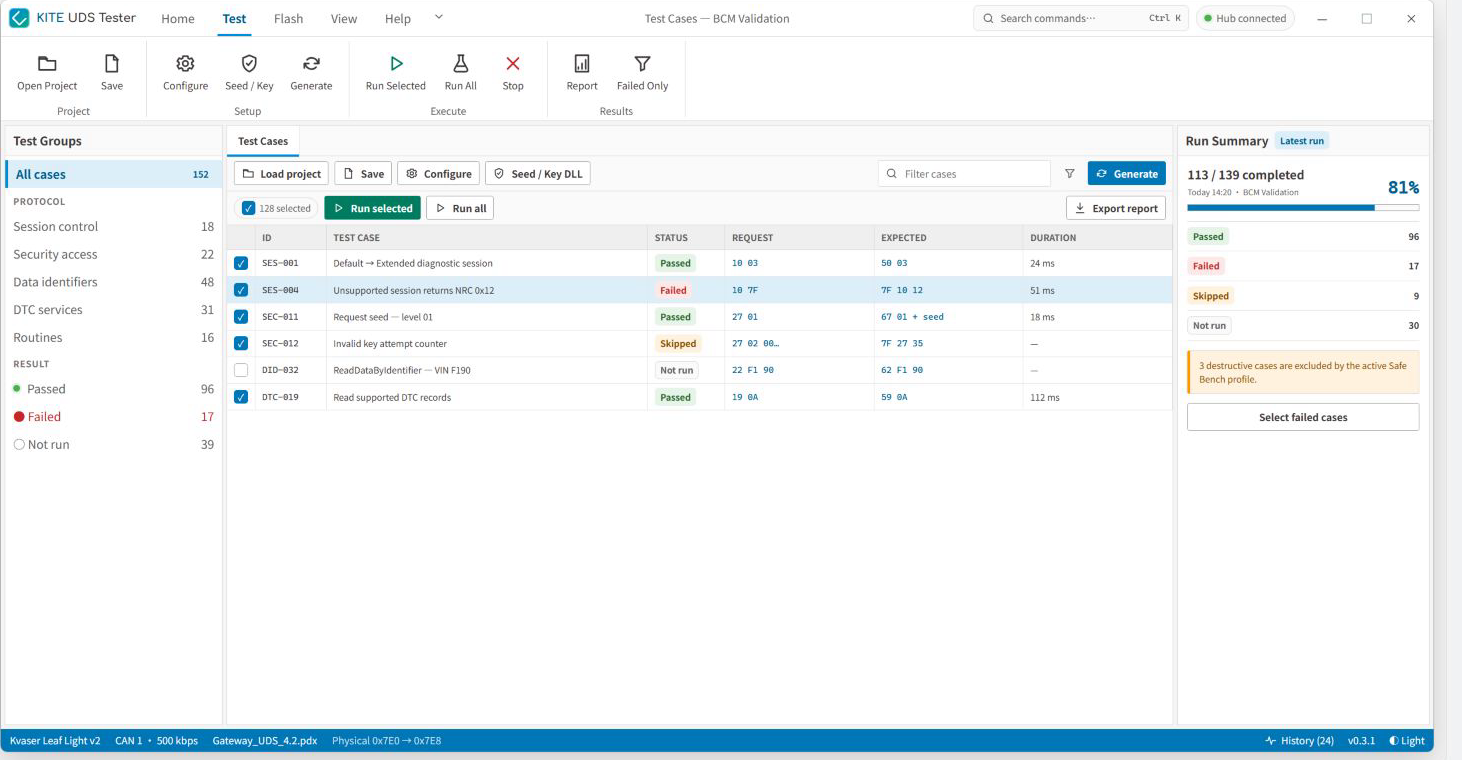
Build UDS test cases from diagnostic services and generator settings, execute them in batches, and rerun failures.
Move from individual service testing to trace, history, test cases, and ECU programming without leaving the workbench.
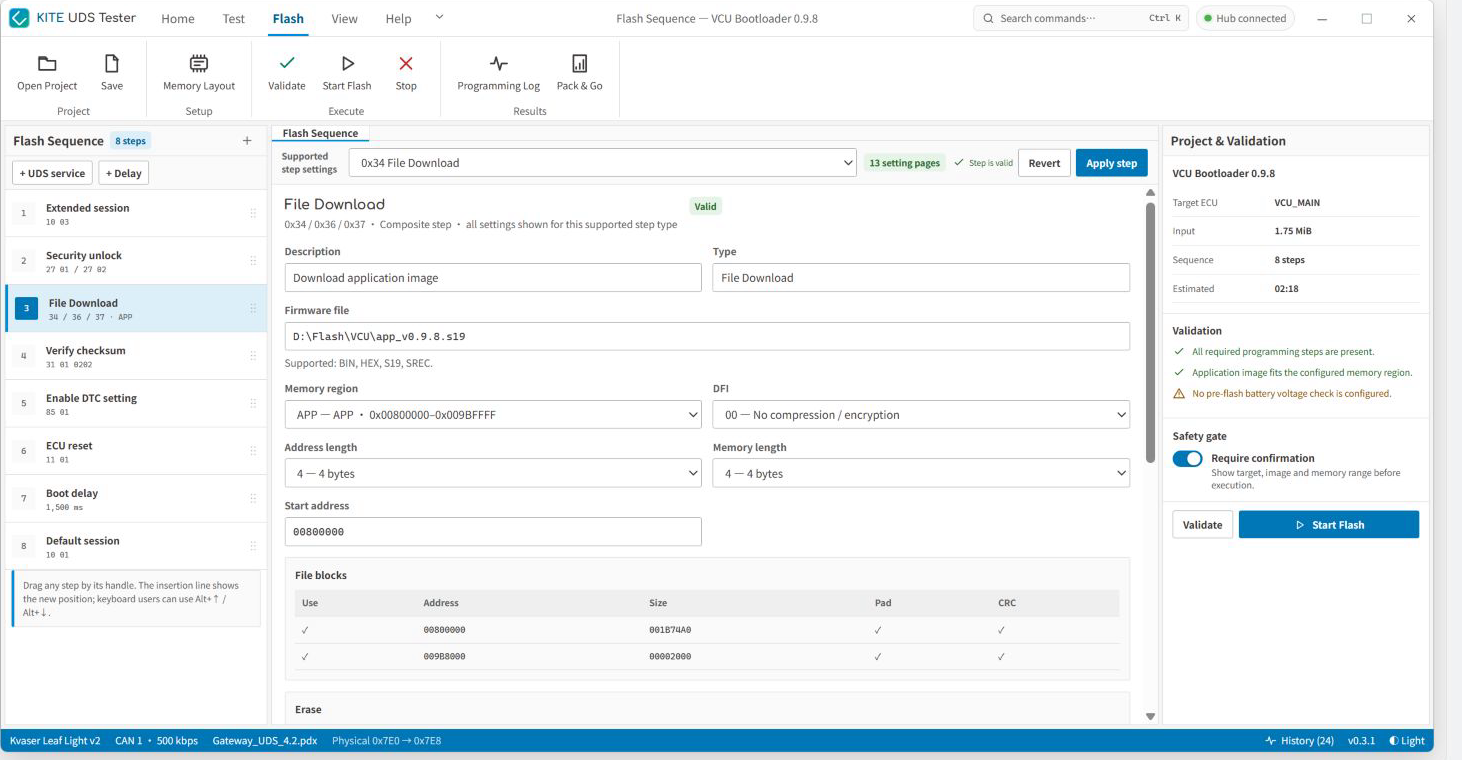
Flash Sequence arranges session, security unlock, file download, checksum, DTC setting, and ECU reset as validated steps, with Memory Layout managing sectors, mappings, and padding.
Screen 01 / 01
Arrange 0x10, 0x27, 0x34 / 0x36 / 0x37, 0x31, 0x85, and 0x11 as reorderable steps, then keep firmware files, memory ranges, file blocks, padding, CRC, and safety confirmation in the same programming project.
The ODX importer accepts PDX containers, ODX-D, ODX-F, and XML, validating references before replacing current data.
The service workbench covers 0x10, 0x11, 0x14, 0x19, 0x22, 0x23, 0x27, 0x28, 0x2E, 0x2F, 0x31, 0x34, 0x35, 0x36, 0x37, 0x3E, and 0x85.
Automatically generated ODX cases run in batches, with results retained as trace, response history, programming log, and PDF, Excel workbook, or JSON reports.
Load a PDX container, ODX-D, ODX-F, or XML. A .udsp test project restores its ODX binding, test profile, case selection, and latest report summary.
Switch fields for 17 SIDs, including access type, DID, DTC mask, memory address, Routine ID, transfer context, and response mode, while preserving a raw-byte preview.
For each SID, show positive-payload decode, expected positive SID, common NRCs and engineering conditions, plus no-response / transport errors.
Configure the CAN interface, ISO-TP transport, physical / functional addressing, P2 / P2*, timeout / retry, TesterPresent, and Seed / Key DLL together.
Generate positive / negative, state, timing, and functional-addressing cases from ODX services and six settings pages, then use Run Selected, Run All, Failed Only, status summaries, and PDF, Excel workbook, or JSON result export.
Arrange session, security, file download, checksum, DTC setting, and reset as reorderable steps. Memory Layout manages sectors, mappings, erase ranges, padding, and file blocks.
Start from an ODX service, .udsp test project, or .kfp flash project, then keep configuration, execution, and results in one diagnostic context.
Load PDX / ODX-D / ODX-F / XML, continue a .udsp test project, or open a .kfp flash project.
Set CAN / ISO-TP, addressing, timing, retries, TesterPresent, and the Seed / Key DLL, then verify interface state.
Automatically generate test cases from ODX services and six generator-settings pages, then batch-run selected, all, or failed-only scopes.
Review decoded responses, NRCs, trace, history, run summary, or programming log, then export PDF, Excel, or JSON.
Fits ECU software and validation teams that need service verification, ODX-driven regression, diagnostic issue reproduction, and ECU programming preparation in one tool.
Tune session, DID, DTC, Routine, SecurityAccess, and upload / download parameters while comparing decoded responses and NRCs.
Automatically generate and batch-run UDS cases from the ECU description, controlling scope with Run Summary, Failed Only, and a safe bench profile.
Preserve trace, response history, request / response pairs, timestamps, and engineering notes as reproduction context.
Use a manual key or external Seed / Key DLL to validate seed / key flows and common NRCs.
Validate the flash sequence, memory regions, firmware blocks, CRC, and safety confirmation before programming starts.